No account
Nothing to sign up for. Download it and it works.
Push-to-talk dictation for macOS that runs entirely on your Mac. Release the key and the text lands in whatever app you were already typing in — in about 200 milliseconds. It can also punctuate and structure what you said, and turn a narrated walkthrough into something an assistant can act on. Still no server, still nothing to pay.
Right ⌥ held — Kyanth listens from the menu bar
Measured, not claimed
ggml-base.en on an M1 Max, key release to text on screen.
Run bench.py against your own voice and check.
How it works
Kyanth lives in the menu bar. There is no window to switch to, no button to find, and nothing to copy and paste.
Any key or chord, as many keys as you like. Modifier-only combinations work best — they cannot be typed, so binding one steals nothing from other apps. Add alternates and any of them starts a dictation.
A pill appears showing your live input level, so a microphone that is hearing nothing looks obviously different from one that works.
The text is pasted where your cursor already was, and your previous clipboard is put back exactly as it was.
Compare
Most dictation apps are a thin client over somebody else's speech API. That is the difference that matters, and it is not a feature list.
| Kyanth | Cloud dictation | |
|---|---|---|
| Price | Free, forever | $10–15 / month |
| Account required | None | Sign-up, email, billing |
| Works offline | Always | No |
| Where your audio goes | Nowhere | Their servers |
| Source code | Public | Closed |
No competitor is named, because the point is structural rather than competitive: a hosted API cannot be private, and a local model cannot bill you monthly.
The app
Hand-drawn AppKit, both appearances — pin Kyanth to light or dark on its own without changing the whole machine — and a setup process that refuses to call itself finished until it has proof.
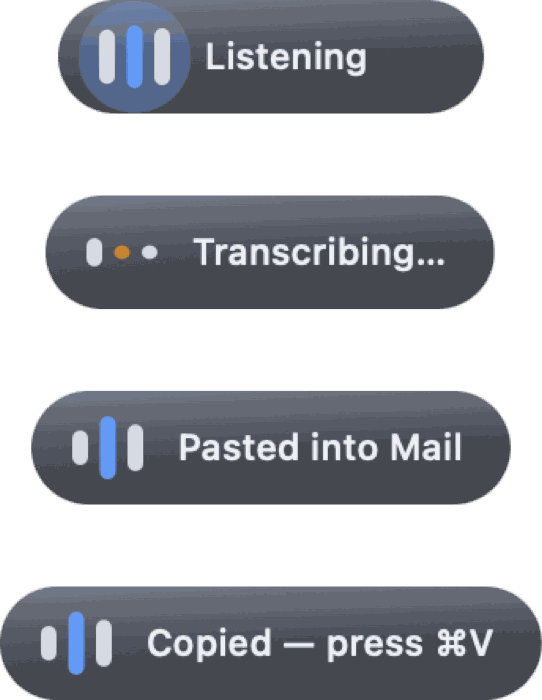
Silence is the worst failure a dictation tool can have. Six states, six sentences — listening, transcribing, pasted, left on the clipboard, nothing heard, something went wrong.
The three bars are the meter. The centre carries your live level and the outer two replay it a few frames later, so a syllable travels outward.
It floats above other windows without ever taking focus. An overlay that stole focus would redirect your speech into itself.
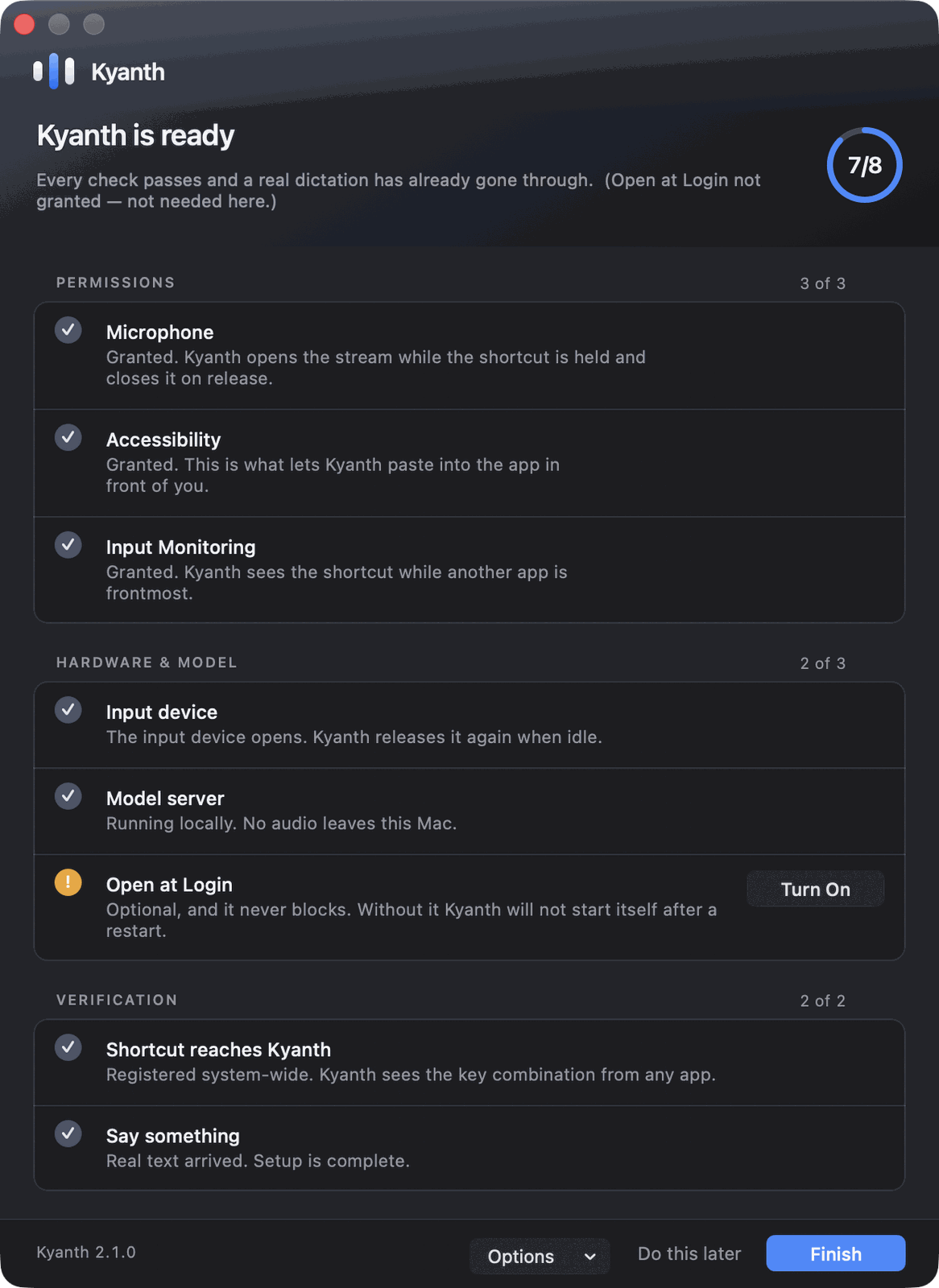
Nine checks in three groups, re-evaluated every second — flip a switch in System Settings and the row turns without a relaunch.
The last check is the one that matters: Finish stays disabled until a real dictation has produced real text. Green permissions prove configuration, not function.
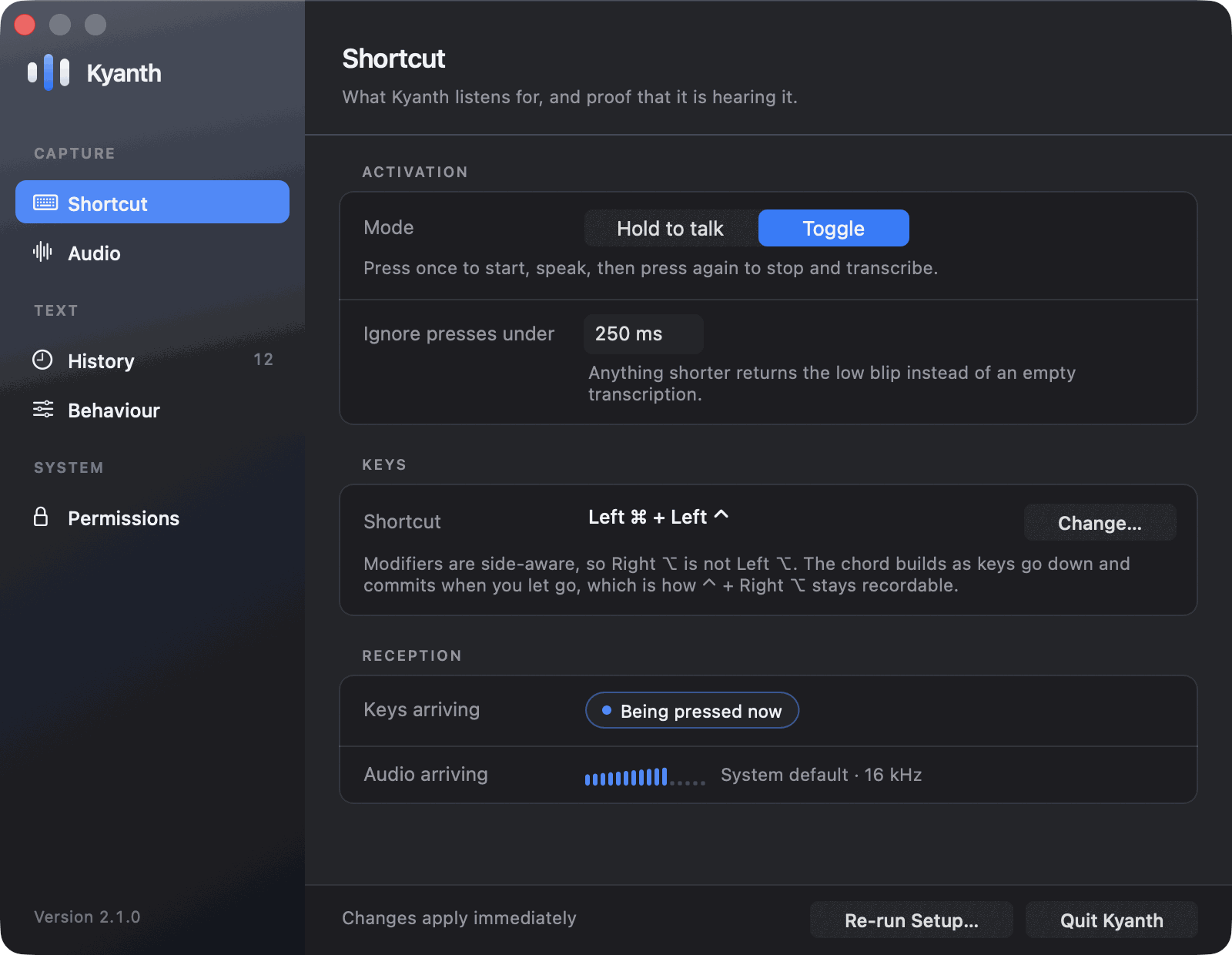
Modifiers are side-aware, so Right ⌥ is not Left ⌥, and chords commit when you let go rather than on the first key down.
A live indicator lights the moment Kyanth receives exactly your chord — the only way to tell a wrong shortcut from one another app swallowed first.
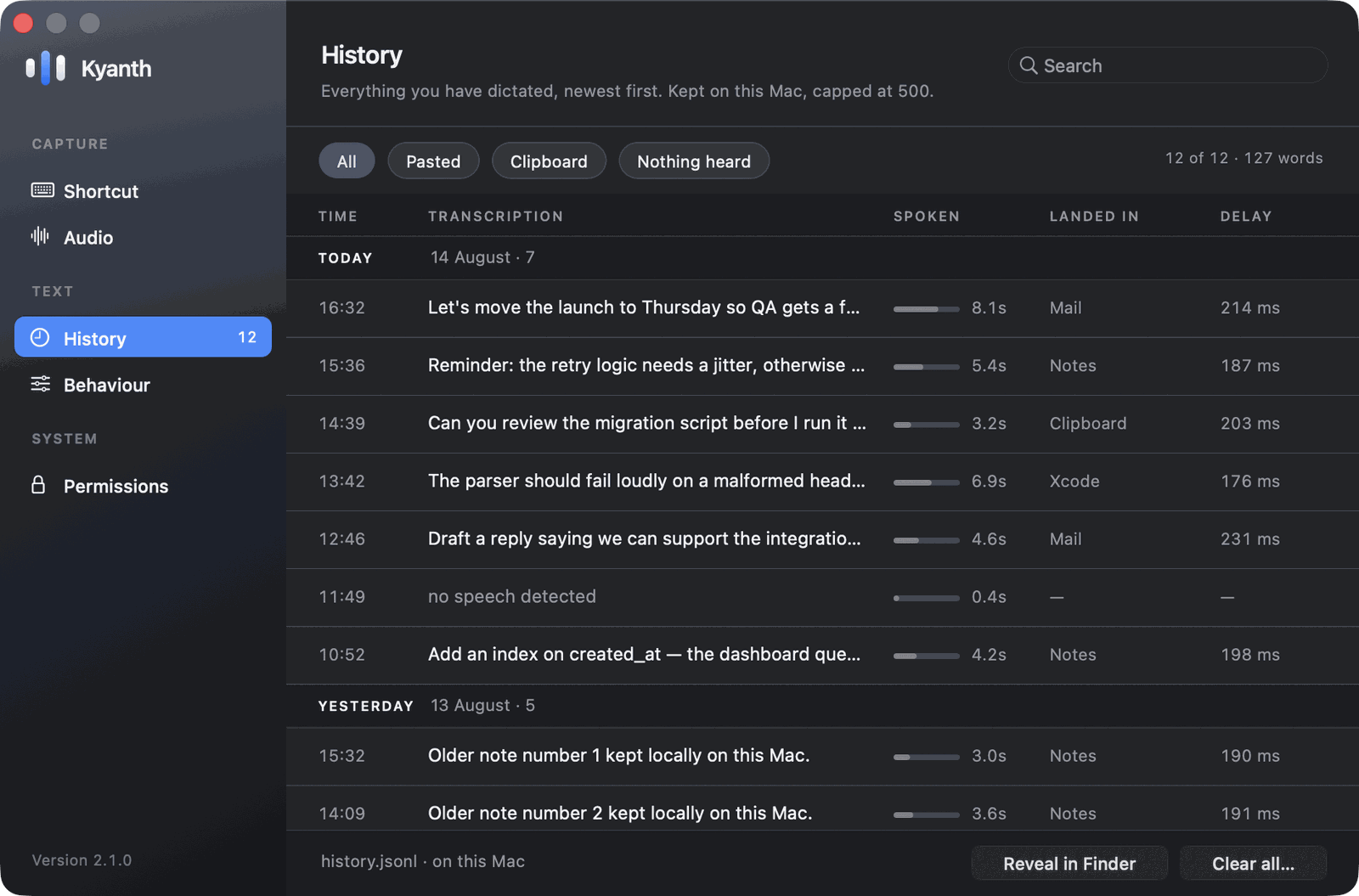
Time, transcription, how long you spoke, where it landed and how long the model took — as columns, not one crushed string.
Search filters as you type. Click a row to expand it in place, with copy, paste-again and delete. Nothing truncates.
When Kyanth restructured something, history keeps both — what you said and what it wrote — and offers each for copying. The version you did not paste is the one you tend to come back for. Capture sessions land here too, with a count of the snapshots, recordings and pointer marks inside.
Stored as a plain .jsonl file you can read or delete at any time.
Beyond dictation
Three things that need context a transcript does not have: what is on your screen, what app the text is about to land in, and what you were pointing at while you spoke. All of it runs locally, all of it lives under one Intelligence pane in Settings, and all of it is off until you turn it on.
Kyanth reads the window you are dictating into and hands the names it finds to the speech model before it decodes — the only moment a rare name can still beat the common word it sounds like.
Its own name was heard as “client”. A find-and-replace rule would have wrecked every sentence about an actual client; biasing the decoder does not, because it raises a term’s odds rather than forcing it.
Nothing is recorded, no image is written to disk, and the words are discarded after a single dictation. Password managers and the keychain are never read.
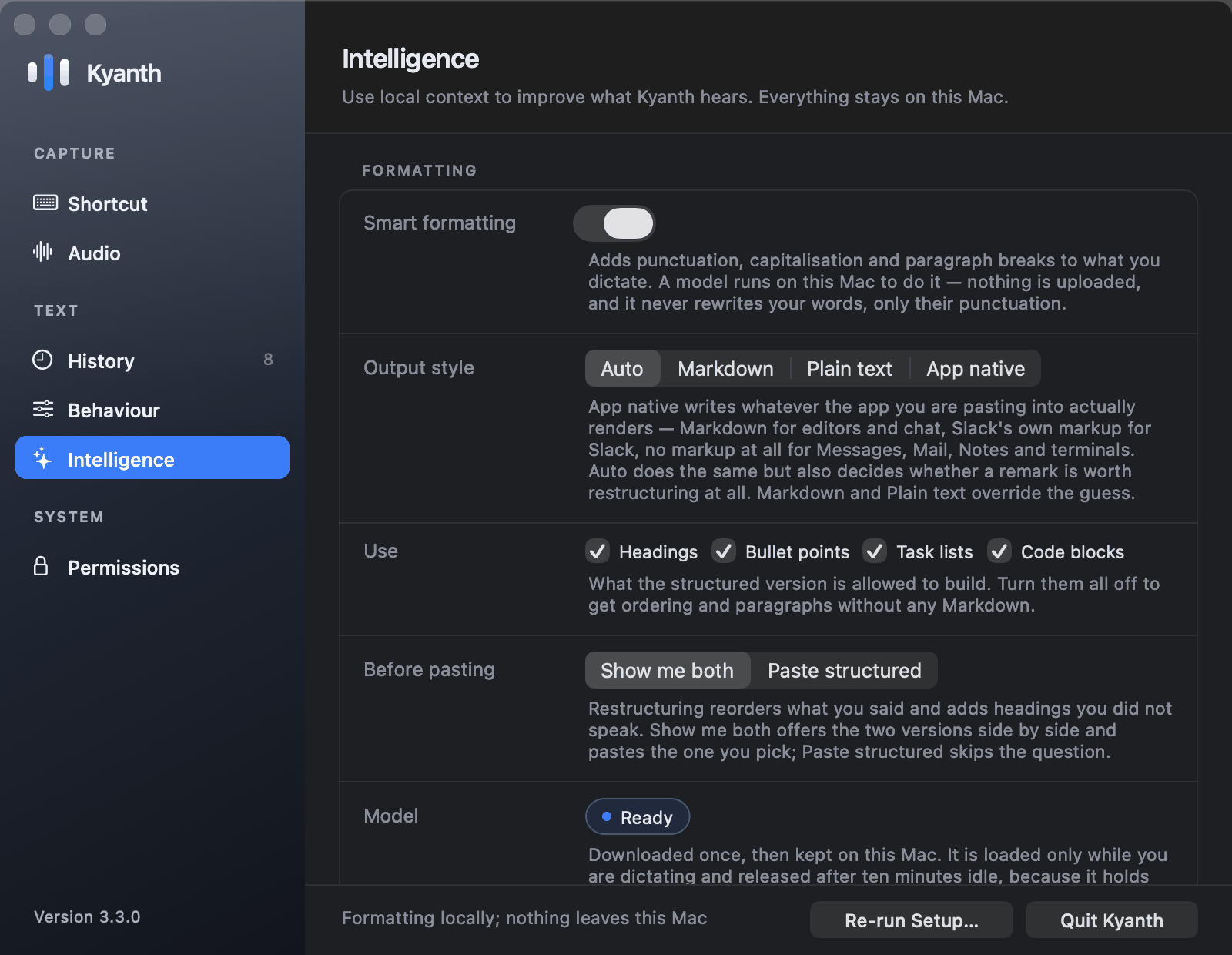
A small model runs on your Mac to add the punctuation and capitalisation that speech recognition drops. Longer dictation can become headings, bullets and task lists — in the dialect the destination actually renders: Markdown for editors and chat, Slack’s own markup for Slack, none at all for Messages, Mail and terminals.
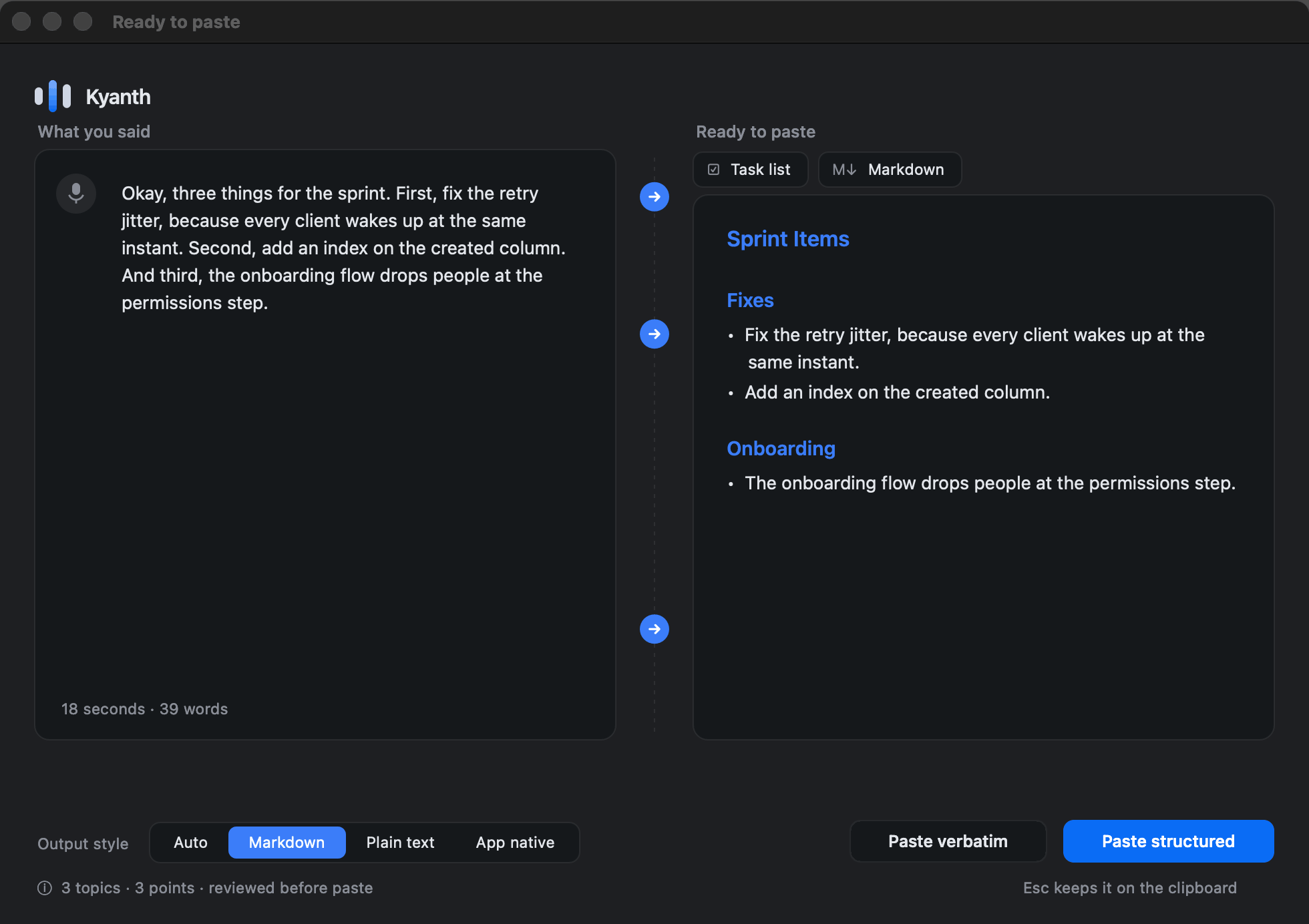
Restructuring reorders what you said, so by default Kyanth shows you both and lets you choose. It is checked against your own words first: anything that summarises, answers, or invents is thrown away and the plain transcript is pasted instead.
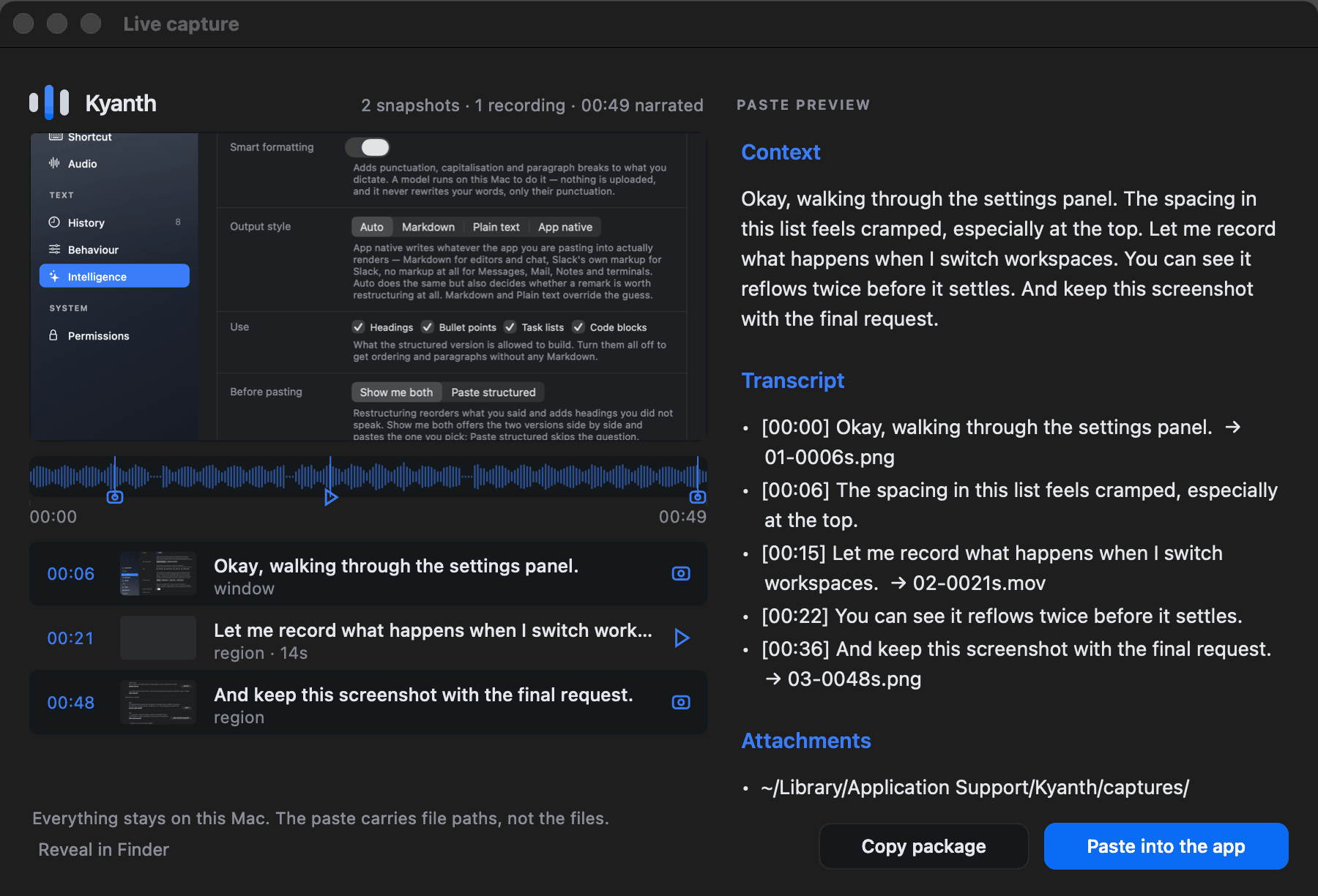
Start a session and the pill opens a row of tools. Take a screenshot, record the screen, a window or a region you drag out — the narration keeps running through all of it, so what you captured and what you said stay on one clock.
Change your mind mid-recording. Pick a different target and the recording is re-aimed rather than restarted: one continuous file that follows you from the whole screen to the window you are talking about. Take as many stills as you like while it runs.
Turn on Pointer and your cursor carries a halo. Hold the draw key and you can circle what you mean — the marks last exactly as long as you hold it and leave nothing behind. Kyanth’s own controls never appear in the shot; its annotations always do.


Finish transcribes the narration with timecodes and attaches every capture to the sentence you were speaking when you took it. A screenshot on its own is a screenshot; the same image against “the spacing here feels cramped” is a bug report.
The package pastes as text with paths to the files, which is exactly what Claude Code and its neighbours read. The media never leaves the folder on your Mac.
Privacy
There is no server to trust, because there is no server. Every model runs on your own hardware — speech, formatting, and the text recognition that reads your screen.
Nothing to sign up for. Download it and it works.
Day to day the only connection is to 127.0.0.1. Turning on smart formatting fetches its model once; after that it never reaches the network again.
No analytics, no crash reporting, no phone-home.
The device opens on your first press and closes after 30 seconds idle, so the macOS recording indicator is not on while you work.
Plain JSONL under Application Support, capped at 500 entries. Delete it whenever you like.
A Developer ID build that opens with no Gatekeeper warning and keeps its grants across updates.
Off until you turn it on. What is read builds one term list for one dictation and is then discarded — never written to disk, never a password manager.
Screenshots, video and transcript go to a folder on your Mac. Pasting a package sends the paths, not the files.
Self-contained — Python, the speech model and the transcription engine all ship inside the app. No Homebrew, nothing to build. macOS 15 or later, Apple silicon.